Pico MZ-80K floppy disks (2)
The quest continues! The disk images I found a couple of days ago turned out not to be MZ-80K compatible ones (at least, not with the original drives and SP-6015 BASIC configuration) so I ended up back at square 1.
Reading the SP-6015 Disk BASIC manual (the link goes to a copy from the sharpmz.net site, but without the zip wrapper) it became “clear” that the boot disk was provided with a program to initialise a standard disk.1 I really didn’t think that I was going to ever find anything as poorly translated into English from Japanese as the SP-5025 BASIC manual, but here we are.
Hunting around in the depths of the sharpmz.net site, I found three programs – one to initialise a standard disk, another to change the volume label and one to convert a standard disk into a boot disk.
The boot disk creator initialises track 0 – the bootstrap code that needs to be run after the FD ROM has selected a boot disk, but it doesn’t write any bootable software to tracks 4-14 for the bootstrap program to copy into memory and run.
However, it didn’t take long to write a quick and dirty C program on a Raspberry Pi to copy the tape file of SP-6015 into these sectors.
And …
It didn’t work. The disk started to boot, didn’t copy tracks 4-14 to memory and then printed a corrupt directory listing to the screen.
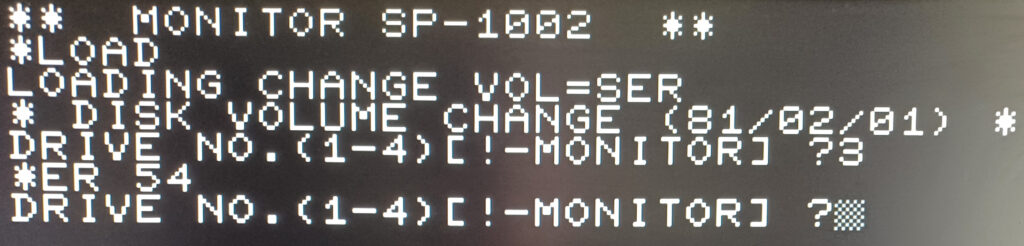
Further tinkering with the volume number change program (the smallest and simplest program I could find) reveals that some kind of CRC check is performed after a write. This program eventually fails after a number of write attempts with an ER 41, because the CRC check fails. The data has definitely been written to the microSD card ok, but the volume number change program thinks that it hasn’t.
Depending on how I hack the floppy handling code, I can also get it to fail earlier with an ER 54 (disk unformatted) when the volume number is attempting to be read off the disk.
Next step – disassembly of the programs I have, to see if I can figure out how the CRC is being generated and checked after a write, and to see what else I’m missing. Probably lots of subtle stuff. For example, track 0 handling seems to be rather different to the way other tracks are managed. Not that surprising I suppose.
Lots more lovely software archaeology and reverse engineering is required!
- The SP-6015 manual and other contemporary programs and documentation refer to them as master and slave disks which is somewhat jarring to my 2024 sensibilities. I’m therefore going to adopt the terms boot and standard instead. ↩︎
Hi Tim,
i recently stumbled across your project the “Pico MZ-80K” and was immediately set on fire. I was an owner of a MZ-80K since early 1980 and used it to improve my programming experience on Z80 level mostly. As a young student i could not afford a floppy drive immediately but after a while i could get my hands on a floppy controller and two cheap 5.1/4 inch drives. Build a housing to hold the controller, the drives and a power supply and was then happy to start chasing CP/M programs, which was only possible after a RAM upgrade, if i remember correct.
So after finding your project i ordered the Pimoroni VGA Demo Board, pulled a Pico 2 from one of my drawers, connected everything and now have a working virtual MZ-80K. I am very enthusiastic now to get the past alive a bit.
I recall that loading programs were quite slow and i wrote a program to make it quicker (my programmers nickname at that time was “BAKERSOFT”). Found that still available on Sharp MZ Software Archive (it starts, but of no use due to lack of FD ROM availability). Do you still have plans to continue with the floppy disk emulation for the Pico MZ? That would be wonderful and would bring even more possibilities to get back in time.
As another retro computing stuff i do love Sharp pocket computers. Still have my old PC-1600 (Z80 compatible) and revitalised it since two years. I had written lots of software in assembler but unfortunately lost almost all source code. I have now started last year to reverse engineer my most beloved “DiskWorks”, a program to work with floppy disks, RAM disks, start programs etc. Kind of a Norton Commander for that tiny machine. That is working again right now and got a bit improved already, however, still lots of plans to rewrite the software. Anyway, not too important in this context.
I would appreciate a lot if you could let me know about your plans for the floppy emulation on the Pico MZ.
Thanks a lot,
Xian
Hi Christian,
Floppy emulation is still on my to-do list, but it’s difficult as the way the MZ80K handled disks is unique, and there’s a definite lack of documentation. The progress I made a couple of years ago was definitely through trial and error!
I hope you enjoy the emulator and I will be returning to work on it later in the year when the weather is less good in the UK.
Tim.