Pico MZ-80K floppy disks (1)
Now that I have a release 1 of the Pico MZ-80K, I’m starting to work my way through a number of enhancements that have sprung to mind as I’ve tested it.
The first thing I’ve tried – attempting to make it work on an RC2014 RP2040 VGA board – has hit a bit of a roadblock. For some reason I can’t reliably read from a microSD card. It’s worse than that though – the emulator seems to hang unpredictably and mess up the RP2040. Only re-flashing the board seems to fix it (temporarily). I can’t seem to make the buzzer work either.
I really need to run the board with the stock Picoterm firmware in my RC2014 to check that I have everything soldered properly and then go back to testing it with the Pico MZ-80K code. But I’d have to solder a million pins1 for the bus connector first. I’m really not in a soldering mood at the moment.
So instead, I’ve been looking at the MZ-80K’s floppy disk system, as that should be purely a software endeavour.
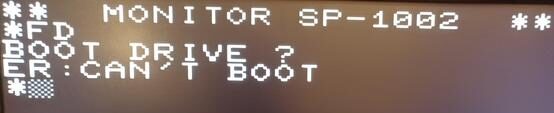
Converting the FD ROM to work in the emulator was straightforward, and typing FD at the SP-1002 Monitor prompt got me as far as I was expecting – telling me that it couldn’t boot. This was not surprising, as I’d deliberately left Z80 port reading/writing out of release 1 as the tape version of the MZ-80K doesn’t need it.
However, the FD ROM needs to read and write at ports 0xF8 – 0xFB to control the disk drives.
It shouldn’t be difficult to set up files to mimic floppy disks on the Pico’s microSD card. The format for boot disks and non-boot disks is well defined, if a little eccentric, even for 19802.
I have a commented assembly listing of the FD ROM, plus a couple of contemporary articles about the workings of the MZ-80K’s drives, so I should be able to work out how the ports need to respond in order to control the drives and ultimately perform disk reads and writes.
The biggest issue seems to be that there are no 5 1/4″ disk images for the MZ-80K available on the internet, anywhere3. This is a big problem, as without a bootstrap loader in track 0 of an attached disk drive, the disk system can’t be used. Implementing a faithful reproduction of the original MZ-80K disk drives was beginning to look like a fruitless quest.
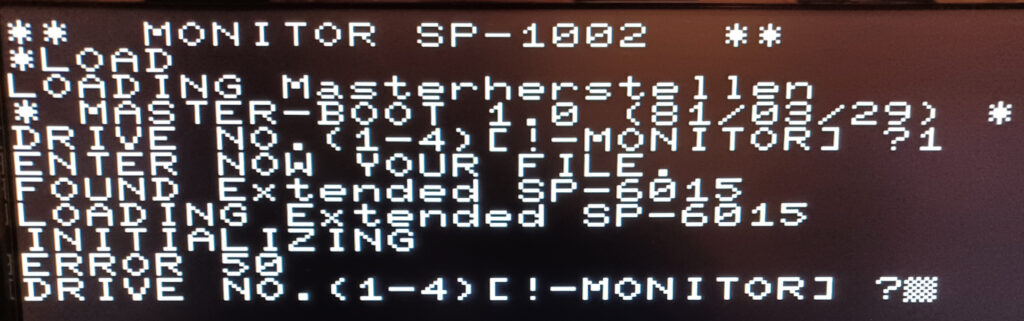
But … I did find a copy of a tape program from the early 80’s that claims to be able to create a new boot disk from scratch. It runs on my emulator and does … something. Perhaps this isn’t a fruitless quest after all.
12th November 2024
I appear to have stumbled across some disk images this afternoon. Hopefully at least one of them is a master boot disk of some description, but the contents of all the disks are undocumented. Exciting!
- OK. I know it’s not a million pins, but it’s more than 40 as I have the version for the enhanced bus. ↩︎
- The MZ-80K floppy disks are double sided, single density – 70 tracks of 16, 128 byte sectors per disk. (Not 80 tracks as most computers of the period used.) Boot disks have a bootstrap loader written to track 0. This enables the first program on the boot disk – often SP-6015 BASIC – to be run. Tracks 1-3 on all disks are reserved for up to 96 directory entries of 64 bytes each. Tracks 4-14 are used by SP-6015 (assuming this is a BASIC boot disk). 15-69 (or 4-69 on a non-boot disk) are for user programs and data. Up to four disk drives can be attached per machine. ↩︎
- There are images in other Sharp MZ disk (and the so-called quick disk) formats around, and Sharp’s SP-6015 disk BASIC has been preserved as .mzf (tape!) ↩︎
do you have any of these for sale or the information for one to be built?
Hi Graham,
The Pico MZ project is open source and is software only. See https://github.com/psychotimmy/picomz-80k/blob/main/README.md for a summary of supported hardware and a link to the full documentation for the project. I therefore have nothing to sell!
At the moment, I don’t have enough information to get floppy disk emulation working correctly for the MZ-80K emulator but I do intend to revisit it at some point – but given the general lack of documentation concerning the way in which the MZ-80K drives worked I’m not very hopeful of ever getting disks working properly in the emulator. The good news is that most of the software that was made available on floppies for the MZ-80K (and still exists) is already in .mzf / .mzt (tape) format, so should run on the emulator as it currently stands.
Tim.